
Online privacy, also known as internet privacy or digital privacy, refers to how much of your personal, financial and browsing information remains private when you’re online.
Online security is not a subject to take for granted in this tech-savvy 21st century. Everyone is busy downloading or uploading data on the internet, exposing themselves to various cybercriminal attacks. By clicking on any suspicious link or visiting a disguised site, you could lose a chunk of data you have worked all your career life to generate.
As businesses remain vigilant about cybersecurity issues, people are finding interest in the many ways they can safeguard their data while operating on the digital space. With that in mind, this article can help you stay anonymous online while keeping your data secure.
This has become a growing worry, with browsing history and personal data all potentially at risk when online. Staying one step ahead, people usually set up a virtual private network (VPN) that gives you online privacy and anonymity by creating a private network from a public internet connection. VPNs mask your internet protocol (IP) address so your online actions are virtually untraceable.
But one thing people do not realize is that a VPN won’t protect you from any type of spyware or malicious data people might come in contact with during their interactions online. Most of the spyware attacks are actual reverse shell connections, where a malicious piece of data executes a command that will connect your device to the attacker.
More on how reverse shell connection works in this video.
If you want to stay ahead of spyware and surveillance technology, you should consider some reliable reverse shell reversing options. Practically, there are 2 common ways people are using to stay safe from spyware attacks.
One idea is to set up a Virtual Machine on your device, which pretty much means that you’ll be setting up a complete OS that will run on top of your operating system, that will run in a virtual sandbox and restore to its defaults for each new session.
This can be also done on any PC running Linux if you decide to install one of the many privacy-focused distributions like ParrotOS, Kali, MOFO Linux, Tails, Qubes OS or others. These distributions have a built-in feature often referred to as Amnesia, which means that your device always starts from the same clean state and everything you do disappears automatically when you shut down the device.
But that means it’s somewhat difficult to install and run any software on these distributions, as you have to be skilled enough to include your personal files and software in the installation so it won’t get deleted when you shut down your device.
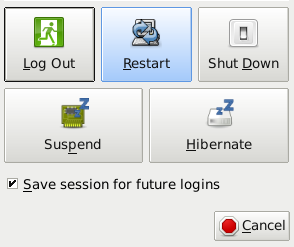
As of recent, all XFCE desktop builds such as Manjaro, Fedora, Debian, Mint, etc., contain a feature that, when turned on, will immediately clear and wipe all data from the current user session and render it permanently gone. This feature can be activated in settings and you will be prompted if you want to save this session for future logins on your shut down screen.
Most Linux Distros can be configured to automatically wipe the Bash History on session end, and this will also remove most spyware, malware and shell connections to then return to the original OS version it started with. In case you need to update software or save some files you trust, you can do this by booting up your device, running a software update, and rebooting it to save the session for any future logins. This will create an updated XFCE reference and run its most recent updated version for all your apps.
In sessions where you would have been exposed to online threats just end your session with a reboot without saving this session for future logins, and that will destroy all your data, cache, and any history created during your session. Data can be exported to a trusted point or cloud as long as you always install new software after a safe restart to a trusted session.

When it comes to phones, running DeGoogled Android can seem like the ultimate privacy solution, however, this will only solve Google tracking woes, and they can become impractical as most of the apps you would be using would rely on Google Play services to run. With some dependency patches, apps will most likely be able to run without Google Play services and instead, rely on other services like Amazon, Huawei or any other companies that have created and released an independent app store.
The e/ project is the most popular among the DeGoogled options that provide current Android versions with the stock Android apps and zero bloatware. However, e/ still runs an Android version that is severely susceptible to spyware attacks much like the one that affected Pegasus or an independent shell hack attack.
And lastly, since PostMarketOS was released, there is a real Linux distribution available for phones and more than 200 devices are supported by this time. It is easy to set up and to use on your phone as the installation process requires configuring your device to accept custom ROM images. It can be flashed to nearly any device with the TWRP recovery and the TWRP setup for all devices is highly documented.
Using PostMarketOS is currently suitable for more tech-savvy users and users that have more experience with Linux in general. In terms of privacy, PostMarketOS can be configured to wipe all user and session data on each reboot. You can also run your favorite Android Apps inside the Anbox Virtual Machine, thus making it extremely difficult for spyware that you are attacked with, in your android VM to roll over to your actual OS on the device.
There are a ton of devices popping up on the market that come with Linux installed off the shelf. My favorite are the Pine64 community projects called the Pinebook Pro, a $200 laptop that is powered by an old smartphone chip on a Raspberry Pi-like board, and its handheld sibling the PinePhone. These devices offer subpar performance but their main perks are privacy rather than performance.
The Librem 5 is another smartphone that comes with a Linux distro out of the box and its most important feature is the privacy bolstered with the hardware kill switches for network, camera, mic, radio, GPS etc.
System76 also sells rebranded Clevo Laptops and Desktop units that have a custom Linux distro on them that encourages gaming.
Privacy protects our information we do not want to be shared publicly such as health or personal finances. Privacy helps protect our physical safety in cases where social media breached real-time location data privacy. Personal data is used to make very important decisions in our lives.